Appointment Double Booking Prevention for Insurance Agencies

Double booking on an insurance phone floor almost never comes from one bad click. It comes from two systems, or two people, both believing they own the same slot. The fix is structural: one calendar that owns each agent’s time, one rule for who can write to it, and one confirmation sequence that runs the same way every time. This guide covers that setup for agency owners, sales managers and licensed agents who book quotes, reviews and callbacks off live calls, purchased leads and transfers.
TL;DR
- Give every agent one master calendar and make every booking channel (dialer, CRM, text, web form, manager) write to it.
- Check every connected calendar for conflicts, including shared and co-host calendars. Google does not check co-host calendars by default.
- Set working hours, buffers, daily caps and minimum notice before you turn on self-booking.
- Route each lead to one owner before an appointment is offered, so two agents never chase the same prospect.
- Run a fixed confirmation sequence: instant confirmation, reminders, a one-tap reschedule path and a cancellation that frees the slot.
Table of Contents
- Why double booking happens on a call floor
- Start with one source of truth for each agent’s time
- Fixing calendar sync issues
- Availability rules that block conflicts before they happen
- Preventing duplicates: lead ownership and live transfers
- Human error: the part software does not fully remove
- Building the appointment confirmation workflow
- Where RevRing.com fits
- Our perspective
- FAQ
- Sources
Why double booking happens on a call floor
A double booking means two appointments land on the same agent in the same time slot. In a small office, someone notices. On a floor with 10, 30 or 100 seats, nobody does until a prospect is waiting on a call that never comes.
The causes repeat across agencies:
- Calendars that do not talk. The agent’s personal calendar, the CRM calendar and a scheduling link each hold part of the picture.
- Several people booking for one agent. A sales manager, an assistant, an inbound rep and a self-booking link can all offer the same 2:00 p.m.
- Stale availability. An agent goes to lunch, takes a carrier training or leaves early, and the hours in the system never change.
- Manual entry. Someone takes a callback on a sticky note, a spreadsheet or a text thread and enters it late, or never.
- Duplicate leads. The same prospect arrives from two lead vendors or a live transfer and a web form. Two agents each book them.
That last cause is specific to agencies that buy leads, and it is the one generic scheduling advice misses. A slot conflict is a calendar problem. A duplicate prospect is a lead management problem. You need to solve both.
Start with one source of truth for each agent’s time
Pick the system where an agent’s availability lives. For most agencies that is the CRM calendar, because the CRM already knows the lead, the owner, the disposition and the next step. Everything else reads from it or writes to it.
A workable rule set:
- One calendar per licensed agent. Never let two agents share a single calendar to “save setup time.” Shared calendars are a classic way to produce overlapping slots that nobody can attribute.
- One writer path. Appointments are created through the CRM or a booking link tied to it. No side calendars, no personal Outlook invites for prospect meetings.
- Named ownership. Every appointment has one agent of record. If a manager books for an agent, the appointment still lands on that agent’s calendar and shows who created it.
- Group calendars for teams only when needed. A team round robin should check each member’s calendar and assign a single person. It should not drop the booking onto a shared pool.
If your agency uses a CRM like HubSpot, Pipedrive or GoHighLevel, the same rules apply. Choose one of them as the calendar owner and connect the rest in one direction where you can. Two-way sync between three tools multiplies the places a conflict can slip in.
Fixing calendar sync issues
Sync problems look like phantom availability: a slot shows open when the agent is plainly busy, or it shows blocked when nothing is there. Work through them in this order.
Check what the system is actually reading
Most scheduling tools only avoid conflicts with calendars you tell them to check. Google’s own help documentation says an appointment schedule can check selected calendars for availability, that co-host calendars are not checked by default, and that you should include them in the availability check to prevent double bookings. The lesson applies to any tool: list every calendar an agent uses, then confirm each one is in the conflict check.
For each agent, write down:
- The primary calendar that holds prospect appointments.
- Any personal, carrier, training or compliance calendars that block time.
- Any assistant or manager calendars that also book into the agent’s day.
If a calendar is not on that list, a booking tool will not see it.
Look for overlapping availability windows
When several staff members sync to one calendar, or their availability windows overlap, bookings stack up. The cure is to separate people onto their own calendars and tighten the windows so two agents are not offering the same hours through the same link.
Test sync with a conflict on purpose
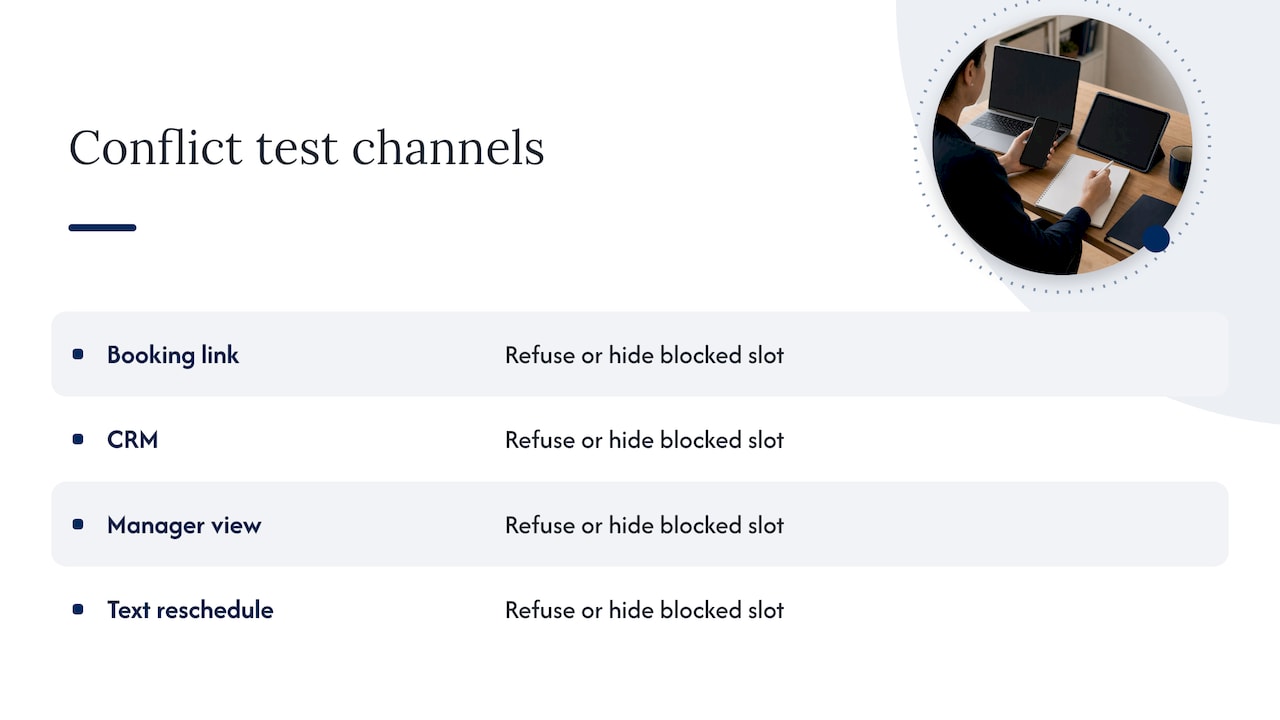
Once a quarter, and after any CRM or calendar change, create a test block on one agent’s personal calendar. Then try to book that exact time through every channel: the booking link, the CRM, a manager’s view and a text-based reschedule. Each channel should refuse or hide the slot. If one accepts it, you found your leak.
Watch for time zone drift
Agencies that sell across states book prospects in one zone and agents in another. Store every appointment in a single time zone behind the scenes, display it in the prospect’s local time and the agent’s local time, and state the zone in every confirmation text and email. An appointment “at 3” with no zone is a future no-show.
Availability rules that block conflicts before they happen
Sync is the safety net. Availability rules are the guardrails. Set these before you let prospects or setters pick their own times.
- Working hours per agent. Update them when schedules change, including carrier training days, license renewals and time off. Stale hours are one of the most common causes of overlapping appointments.
- Buffers. Add 10 to 15 minutes after every appointment type so a long call does not collide with the next one. Use a longer buffer after complex reviews than after a short quote callback.
- Appointment types with fixed lengths. A 15-minute quote follow-up and a 45-minute household review should not share a default duration. Mismatched durations create overlaps even when the start times look clean.
- Daily and hourly caps. Limit how many appointments an agent can take in a block. This protects dial time, because an agent whose day is solid with appointments is not making outbound calls.
- Minimum notice. Do not let a link offer a slot ten minutes out unless your agents actually work that way.
- Do-not-book windows. Reserve time for dialing blocks, team meetings and call coaching so those do not get sold to prospects.
Write these as a one-page standard, and apply it to every new agent on day one. The point is to have the same answer when a manager asks “why did the system let that happen.”
Preventing duplicates: lead ownership and live transfers
High-volume teams create double bookings upstream, before a calendar is involved. Two agents work the same lead because the lead was assigned twice, or because a transfer and an inbound call landed within minutes of each other.
Put these controls in place:
- Deduplicate on intake. Match on phone number and email when a lead enters the CRM. Merge or flag repeats instead of creating a second record that gets its own agent and its own appointment.
- Assign one owner at routing. Whether you use round robin, skill-based or geography-based rules, the output must be a single agent. Our write-up on lead management and routing shows how those assignment methods work in one place.
- Lock the lead once booked. After an appointment is set, the lead should stop being eligible for redial or reassignment until the appointment is resolved.
- Handle transfers as a handoff, not a free-for-all. On a live transfer, the receiving agent should be chosen before the call is connected, and the appointment, if one is made, should be written to that agent’s calendar during the call. For a deeper look at that flow, see our guide to insurance appointment setting and 15-minute handoffs.
- Respect multi-buyer and ping-post rules. If you sell or buy leads through a ping-post setup, decide which buyer or agent has the claim first. The mechanics are covered in the ping tree setup guide.
Dialing matters too. A dialer that keeps calling a lead who already has an appointment will generate a second conversation and sometimes a second booking. Suppress booked leads from active dial lists, and review multi-line dialing settings so connected calls reach an available agent with a clear status.
Human error: the part software does not fully remove
Even with clean sync, people create conflicts. A rep books without checking the team view, forgets to log a callback, enters the wrong date, or another rep independently books the same prospect. These are the usual staff-side causes, and they shrink fast when the process is visible to everyone. Shared boards and project management tools built for scheduling-heavy teams show the same habit: every commitment is recorded in one place the moment it is made.
For an agency floor, make three habits non-negotiable:
- Every callback promised on a call is entered as an appointment or task before the next dial.
- Managers book through the same calendar as everyone else.
- Agents check their own day view at the start of each dialing block.
Building the appointment confirmation workflow
A confirmation workflow protects against two things: conflicts and no-shows. Build it as a fixed sequence that fires automatically from the appointment record.
- Immediate confirmation. Send a text and an email right after booking with the agent’s name, the date, time and time zone, the call or meeting method and a reschedule link. Texting prospects requires proper consent, so tie your message rules to your consent management for texting.
- Reminder series. A reminder the day before and another shortly before start is a common pattern. Set the timing to your own show rates and review it.
- Reply handling. Treat a “C” or “yes” as confirmed, a “R” or “reschedule” as a trigger for the reschedule link and a “cancel” as an instruction, not a complaint.
- Rescheduling that rechecks the calendar. The new slot must pass the same availability and conflict checks as the original booking. A reschedule path that bypasses the rules is a double booking waiting to happen.
- Cancellation that frees the slot. When a prospect cancels, release the time at once, update the lead status and decide whether the lead goes back to a dial list or a nurture sequence.
- Agent notification. Send the agent a summary of changes so a rescheduled appointment does not land on a call they thought was cleared.
- Post-appointment disposition. Require an outcome (held, no-show, rescheduled, sold) so your reports show where slots go.
Measure the sequence. Track the share of appointments confirmed, the no-show rate by lead source and the number of conflicts caught by the system versus found by a human. The third number tells you whether your rules are working.
Where RevRing.com fits
Agencies that run a call floor usually stitch together a dialer, a CRM, a texting tool and a calendar, and that is where overlapping appointments breed. RevRing.com puts CRM, calling, two-way texting, automations, lead routing and appointment and reminder automation on one platform, and agencies that already have a CRM can connect HubSpot, Pipedrive or GoHighLevel at no extra cost. Compliance checks, including DNC and litigator screening and calling-hours rules by time zone, run before each dial. These are product features, and your own legal counsel should confirm your compliance program.
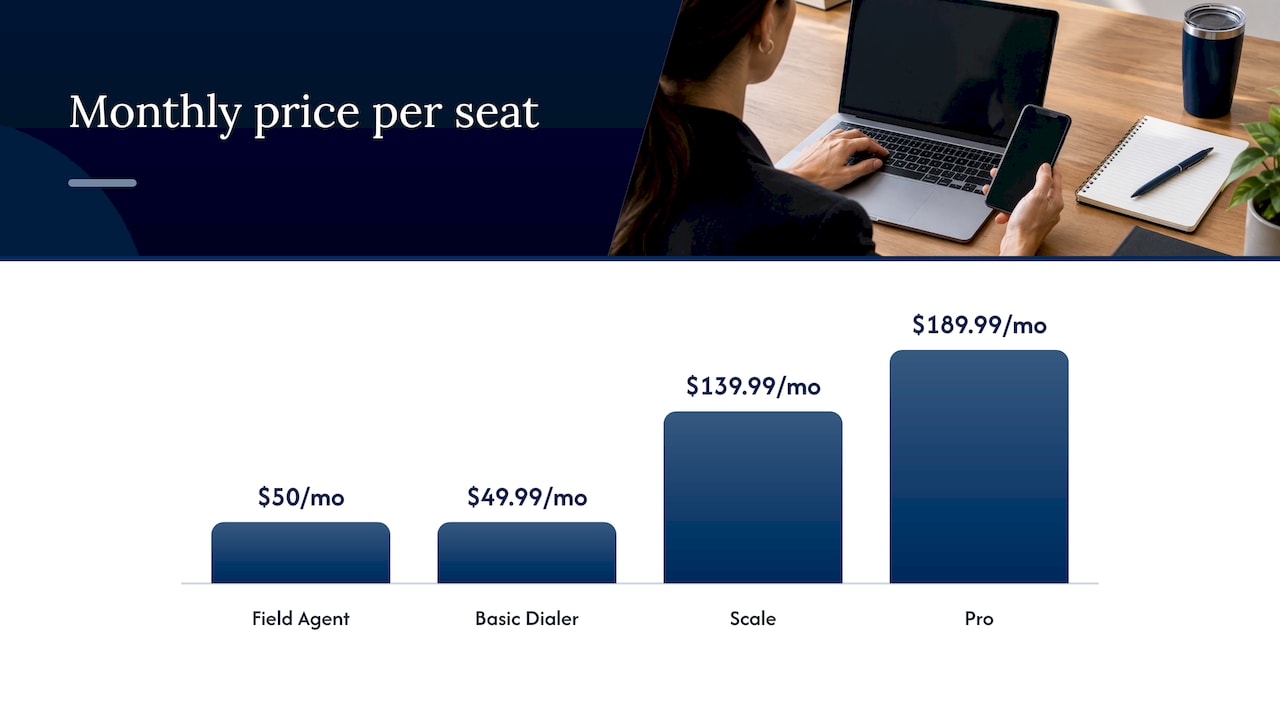
Seat plans are published on the RevRing.com pricing page: Field Agent is $50 per seat per month, Basic Dialer $49.99, Scale $139.99 and Pro $189.99, with Enterprise quoted separately. Calling, texting and AI call scoring are billed on usage. See the insurance industry page for how the platform is set up for agencies.
If your floor already dials from a predictive or power dialer, look at how the RevRing.com dialer ties call outcomes to the lead record, so a booked lead stops getting dialed.
Our perspective
Most double booking advice treats the calendar as the problem. On an insurance floor, the calendar is where the problem shows up, not where it starts. It starts when a lead has two owners, when a dialer keeps calling someone who is already booked, or when a manager schedules outside the system.
We build RevRing.com around that idea: the lead, the call, the text and the appointment should live in one record with one owner. When CRM, dialing, texting, routing and automations share the same data, a booked lead can leave the dial list on its own and a reminder can go out without anyone retyping a time.
Our advice to agency owners is simple. Decide who owns each agent’s time, decide who owns each lead, and automate the confirmation sequence. Then audit it every quarter, because staff, carriers and lead sources change.
Marc
FAQ
What is the fastest way to stop double bookings?
Give each agent one calendar and make every booking path write to it. Then turn on conflict checking against every calendar the agent uses, including shared and co-host calendars, and set buffers and caps. Most overlaps disappear once nothing books outside that calendar.
Why does my calendar show a slot as open when the agent is busy?
The tool is probably not checking every calendar the agent uses, or the sync is one-way or delayed. List all of the agent’s calendars, confirm each is included in the conflict check, and run a test block to see which channel accepts it. Also confirm time zones match across systems.
How do we avoid two agents booking the same lead?
Deduplicate leads when they enter the CRM, assign a single owner through routing, and lock the lead once an appointment exists. Remove booked leads from active dial lists so no second call or second booking is created. This matters most for agencies buying leads or live transfers from more than one source.
What should an appointment confirmation include?
Include the agent’s name, date, time with time zone, the contact method and a link to reschedule or cancel. Follow it with reminders and make sure a reschedule runs through the same conflict checks as a new booking. Obtain texting consent before sending any text.