CRM Data Deduplication: A Practitioner’s Playbook

CRM data deduplication finds records that describe the same real-world contact, account, or lead, then merges them into one trusted record using defined matching and survivorship rules. Start with exact-key matching, email, domain, external ID, for a fast, high-confidence pass, then run progressively looser fuzzy matches inside a sandbox with manual review thresholds before touching production.
Before you run anything, lock down six things:
- A full backup of the affected objects
- A sandbox environment for test merges
- Field normalization rules
- Match tiers (exact, high, medium, low confidence)
- A merge policy for each key field
- An audit log that records every merge decision
Get these six right and everything downstream, tooling, cadence, prevention, gets dramatically easier.
Key Takeaways
Reliable CRM data deduplication combines tiered matching precision, attribute-level survivorship, and a sandboxed, backed-up execution process, not a single bulk delete.
| Point | Details |
|---|---|
| Match with tiers | Use exact matching for email and IDs, fuzzy matching with normalization for names and companies. |
| Calibrate precision | Test thresholds against sample data before trusting Low, Medium, High, or Exact settings in production. |
| Choose survivorship carefully | Prefer attribute-level, per-field merge rules over a single blanket “most recent” policy. |
| Sequence merges safely | Always resolve parent accounts before merging their child contacts to avoid orphaned history. |
| Prevent at the source | Add real-time duplicate checks, unique-value constraints, and integration pre-checks to stop new duplicates. |
| Build hygiene into infrastructure | Revring integrates deduplication rules with CRM connectivity and compliance workflows so cleanup doesn’t break routing or audit trails. |
Table of Contents
- What Is CRM Data Deduplication, Really?
- How Does Matching and Normalization Actually Work?
- How Do You Set Deduplication Rules and Merge Preferences?
- What Does a Safe Deduplication Project Actually Look Like?
- How Do You Handle High-Risk Records Like Accounts?
- How Do You Stop Duplicates Before They Start?
- How Should You Evaluate Deduplication Tools?
- How Revring Builds Deduplication Into Revenue Operations
- Frequently Asked Questions
- Sources
What Is CRM Data Deduplication, Really?
Deduplication has three distinct moving parts, and conflating them is where most projects go sideways. Matching finds candidate duplicates using field comparisons. Survivorship decides which field values win when two records get merged. Merging combines the records and reattaches related items, deals, activities, cases, so nothing gets orphaned in the process.
Skip any of the three and you inherit familiar problems:
- Orphaned deal history when a losing record’s activities don’t reattach
- Silently overwritten field values from a sloppy “most recent wins” rule
- Broken lead routing when a merged record loses its owner or territory assignment
- Inflated pipeline counts that make forecasting unreliable
Deduplication is not a weekend project you check off once. It functions as a continuous control layer that starts at data ingestion. According to ZoomInfo’s CRM hygiene framework, deduplication is treated as an ongoing discipline rather than a cleanup sprint.
How Does Matching and Normalization Actually Work?
Two matching philosophies exist, and most mature CRM data hygiene programs use both.
Deterministic (exact-key) matching compares fields like email address or an external system ID for a literal match. It’s fast and produces almost no false positives, but it’s blind to variation. A practitioner methodology on merge frameworks estimates that exact matching alone misses roughly 30 to 40 percent of real duplicates, because people type “Bob” instead of “Robert,” or “St.” instead of “Street.”
Probabilistic (fuzzy) matching catches those near-misses by scoring similarity across multiple fields. It recovers duplicates deterministic rules can’t see, but every fuzzy rule trades false negatives for false positives, so it needs calibration, not blind trust.
Normalization is what makes fuzzy matching usable. It standardizes data only for comparison purposes, never touching the actual stored value. Common normalization passes include:
- Phone numbers stripped of formatting (dashes, parentheses, country codes)
- Name aliases mapped together (Bob/Robert, Bill/William)
- Address abbreviations standardized (St./Street, Ave./Avenue)
- Unicode characters converted to ASCII equivalents
- Organization noise words removed (“Inc.,” “LLC,” “The”)
Microsoft’s Dynamics 365 documentation lays out a precision scale worth adopting even outside Microsoft’s ecosystem: Low (30%), Medium (60%), High (80%), and Exact (100%). Calibrate the threshold with sample testing, not intuition, run it against a known batch of duplicates and near-duplicates, and check how many it correctly catches versus how many false matches it introduces.
| Field type | Recommended approach | Why |
|---|---|---|
| Email address | Exact match | Unique, rarely reused, near-zero false positive risk |
| External ID / SSN | Exact match | Deterministic by design |
| Full name | Fuzzy, medium/high precision | High variation from nicknames, typos, transliteration |
| Company name | Fuzzy + normalization | Legal suffixes and abbreviations vary constantly |
| Phone number | Normalized exact match | Format varies but the digits themselves are stable |
| Address | Fuzzy, combined with other fields | Abbreviations and formatting vary widely |
The strongest rules combine signals rather than relying on one field alone, email plus domain, or name plus phone number, because compound matches cut false positives without sacrificing recall.
How Do You Set Deduplication Rules and Merge Preferences?
Building a rule that actually holds up in production takes five deliberate steps:
- Pick your match fields. Choose the combination (email, phone, name plus company) that fits the object type you’re deduplicating.
- Add normalization. Apply the phone, name, address, and Unicode normalization options relevant to your data before matching runs.
- Set your precision threshold. Start high (80% or Exact) for the first automated pass, then loosen it in later, more supervised passes.
- Add exceptions. Exclude known non-duplicates, franchise locations sharing a phone number, or family members sharing an address, from auto-merge.
- Test the rule against a sample. Run it against 100 to 200 known records before letting it touch live data.
Once matches are identified, you need a merge preference, the rule that decides which field values survive. Microsoft’s documentation outlines four core patterns: Most filled (the record with more complete data wins), Most recent (the newest record wins), Least recent (the oldest, often most-verified record wins), and advanced per-column survivorship, where each field gets its own winner rule instead of one blanket policy.
Per-field, attribute-level survivorship is the pattern experienced RevOps teams gravitate toward, because it lets the merged “golden record” pull the best value from each source rather than crowning one record the outright winner.

Pro Tip: For fields where you risk losing history, phone numbers, notes, tags, use append mode instead of overwrite mode. Concatenate values from both records rather than picking one, then let a human clean up duplicates in that field later. Losing a client’s mobile number because “most recent” happened to be a stale record is an unforced error.
When two candidate values tie in quality, define a fallback: default to the record created first, or the one with a verified email domain, so the merge logic never stalls waiting on human judgment for every tie.
What Does a Safe Deduplication Project Actually Look Like?
A dedupe campaign that doesn’t blow up in production follows a strict sequence:
- Full backup. Export or snapshot every object you’re about to touch.
- Sandbox replay. Run the entire campaign in a non-production copy first.
- Normalize. Apply your normalization rules before any matching begins.
- Run a tight match pass. Start with exact or high-precision rules only.
- Review a sample of proposed merges. Manually check 50 to 100 before approving.
- Run the controlled production pass. Execute only what passed sandbox review.
- Monitor for side effects. Watch routing, reporting, and integration syncs for a week.
- Iterate with looser criteria. Each subsequent pass can drop the precision threshold slightly.
Most teams need three to five passes to reach a healthy duplicate rate, tightening the review queue each time as confidence in the rule grows. Fairview’s CRM hygiene checklist recommends a target under roughly 3% duplicate contact records for a well-maintained CRM, and suggests tiering merges by confidence: auto-merge in the 90 to 100% band, route 70 to 89% matches to manual review, and only flag anything below that for later analysis.
Build these safety habits into every pass:
- Keep a permanent audit log of every merge, who approved it, which rule fired, what data was lost or combined.
- Route medium-confidence matches to a human review queue, never auto-merge them.
- Retain a snapshot of “loser” record data for at least one full quarter in case a merge needs reversing.
- Verify that related records, deals, tickets, activities, actually reattached to the surviving record.
- Notify sales and support teams before a production pass so they’re not confused by sudden record changes.
How Do You Handle High-Risk Records Like Accounts?
Account and other parent-level records carry more risk than a simple contact merge because dozens of other objects, deals, contacts, cases, integrations, may point to them. Merge the wrong account and you can orphan an entire deal history or break a sync with an external billing system.
Resolve accounts before their child contacts, never after. Merging a child record while its parent account is still duplicated just moves the mess up a level. If a true merge isn’t safe, consider a master and child parent model instead, keep both accounts intact but designate one as authoritative for reporting, or reassign orphaned children to a new master holding record while you sort out ownership.
A few non-negotiables for related items:
- Preserve deal and opportunity history through the merge, not after it.
- Test reattachment in the sandbox before running the production pass.
- Never delete a losing record without a verified backup in hand.
Pro Tip: Sequence matters more than speed here. A practitioner-focused merge methodology flags parent-before-child sequencing as the single highest-stakes decision in the entire process, get it backward and you risk orphaning history that’s expensive or impossible to reconstruct.
How Do You Stop Duplicates Before They Start?
Cleanup is reactive. Prevention is what keeps your CRM data integrity intact long term. Build these controls into every entry point:
- Run real-time duplicate checks at the moment of submission, on web forms, not after the fact.
- Apply unique-value constraints to key fields like email or external ID.
- Normalize data at ingestion, not just during periodic cleanup passes.
- Require any integration to query the CRM before creating a new record.
For integrations specifically, three habits matter:
- Confirm whether an integration supports “check and update” instead of “always create.”
- Use enrichment APIs carefully, some enrichment tools create new records rather than updating existing ones.
- Audit every integration quarterly to confirm it’s still respecting your duplicate checks.
On the UX side, make required fields do real work, add auto-fill suggestions as reps type, build mobile-friendly duplicate alerts into your predictive dialer workflow, and train reps to search before they create a new record. A five-second search habit prevents a five-hour cleanup later.
How Should You Evaluate Deduplication Tools?
Pick tools by capability, not brand recognition. The checklist that matters:
- Normalization depth. Does it handle phone, name, address, and Unicode normalization out of the box?
- Fuzzy-match sophistication. Can you set precision thresholds, or is it exact-match only?
- Per-field survivorship. Can each attribute have its own merge winner rule, or is it one blanket policy?
- Sandbox support. Can you test a bulk merge before it touches production?
- Manual review queues. Does it route medium-confidence matches to a human instead of auto-merging them?
- Audit logging. Is every merge decision recorded and reversible?
- Scheduled passes and API hooks. Can it run on a cadence and integrate with your existing CRM connectivity?
Know your platform’s native ceiling before you plan a bulk operation. Some CRM platforms cap how many records you can merge in a single action or lack fuzzy matching entirely, as vendor documentation on auto-merge features shows, which is exactly why sandbox testing before a production run isn’t optional. Native CRM tools work fine for straightforward exact-match cleanup; a dedicated dedupe platform or managed service earns its cost when you’re dealing with fuzzy matching at scale or industry-specific compliance requirements.
How Revring Builds Deduplication Into Revenue Operations
Revring treats deduplication as infrastructure, not a bolt-on utility. Duplicate detection runs inside the same layer as CRM connectivity, AI automation, and compliance workflows, so a merge doesn’t accidentally break lead routing or a compliance audit trail.
In practice, that means:
- Reduced duplicate routing, so a lead doesn’t get called by two agents at once.
- Faster agent response because reps aren’t sifting through five copies of the same contact.
- Preserved activity history through merges, so call logs and notes survive the cleanup.
- Industry-tailored rules for regulated sectors like insurance and healthcare, where preserving an audit trail isn’t optional.
Common Mistakes and What Actually Works
The recurring failure pattern: treating dedupe as a one-off project, auto-merging low-confidence matches, or merging child records before resolving their parent accounts. What holds up instead is a tiered confidence model, mandatory sandbox passes, attribute-level survivorship, and prevention built into forms and APIs from day one. Ongoing hygiene beats a single heroic cleanup every time.
Get Help Running a Safe Deduplication Campaign
Running a multi-pass dedupe project on top of your existing sales operation takes bandwidth most teams don’t have sitting idle. Revring integrates deduplication rules directly into its CRM connectivity and automation layer, so sandboxed passes, confidence tiering, and audit logging happen alongside your normal lead routing and dialing workflows, not as a separate side project.
That means fewer duplicate contacts clogging your lead marketplace pipelines, faster agent response on merged records, and monitoring that keeps working after the initial cleanup instead of quietly decaying again in six months. If your team is managing CRM data quality across insurance, real estate, healthcare, or high-volume lead generation, see how Revring’s platform handles it end to end on the Revring pricing page or explore the full platform overview to schedule a walkthrough.
Frequently Asked Questions
What is CRM data deduplication? It’s the process of finding CRM records that describe the same contact, account, or lead, then merging them into one record using matching rules and a survivorship policy that decides which field values to keep.
How often should you run CRM data cleanup? Most revenue teams run a full deduplication pass quarterly, backed by lighter automated checks monthly, a rhythm that keeps pace with typical B2B contact data decay of roughly 2.1% per month.
What’s the safest way to deduplicate CRM records without losing data? Back up the affected objects, replay the entire campaign in a sandbox, run a tight exact-match pass first, manually review a sample of proposed merges, then loosen the matching criteria over several iterative passes.
Should I auto-merge every duplicate my CRM finds? No.
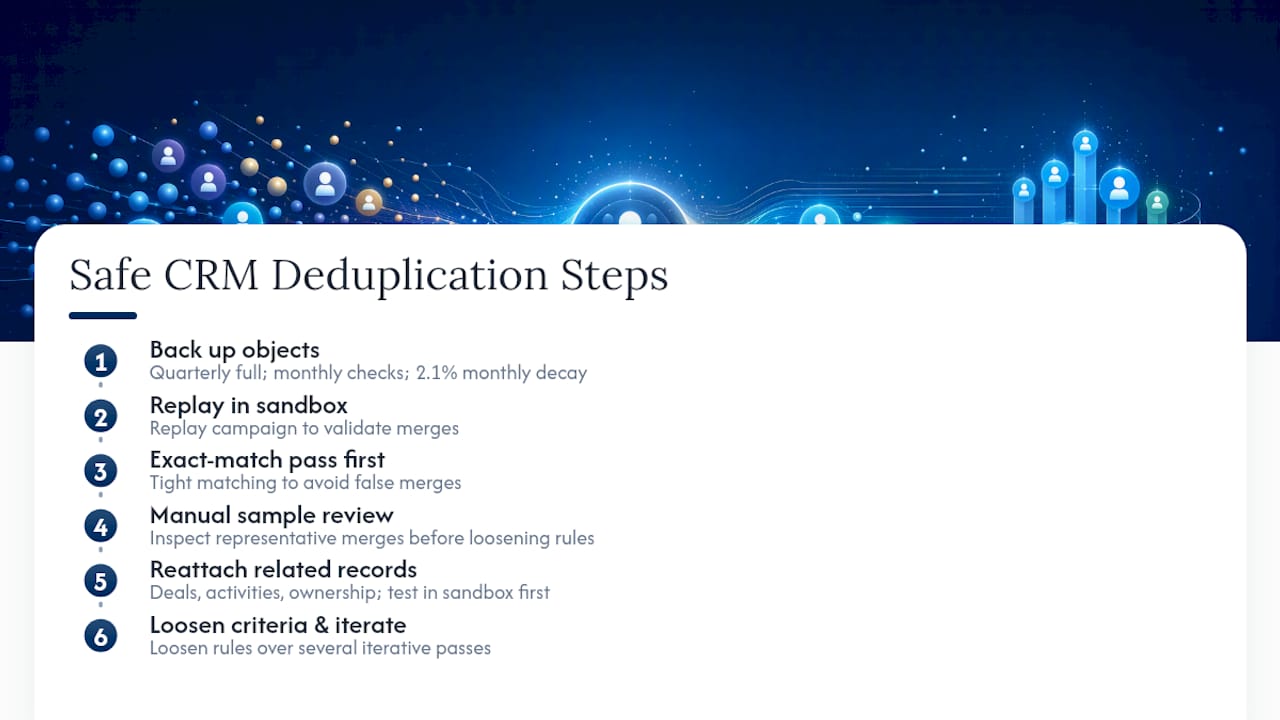
How do you remove duplicate contacts without breaking lead routing? Reattach related records, deals, activities, ownership, before finalizing any merge, and test that reattachment in a sandbox first so a live merge doesn’t silently strip a contact’s assigned rep or territory.